Payment

Which K-12 platforms put parent messages and tuition payments in one app? Six decision criteria and a side-by-side look at the options private schools use.
For a private K-12 school, the best education management software for parent communication and payments is the one where a family reads the school’s message, checks the grade, and pays the bill in the same app, and the payment lands on the same student record the office works from. Sycamore does that natively, with email, SMS, and push messages, tuition plans, and card and ACH payments behind one login, and the school decides who covers the processing fee. FACTS gets close when the school also bills through FACTS, through a school-branded Family App. Blackbaud and Veracross can do both jobs, but usually across separate products, portals, or partner apps. Gradelink, Alma, and SchoolCues cover the pair for smaller schools with real trade-offs. ParentSquare is excellent at messaging but isn’t built for tuition, and brightwheel and Procare are built for childcare centers, not K-12 records. If you only ask about one thing, ask how a family gets from “your October installment is due” to “paid” without leaving the app.
I set up the parent app and payments for schools that are new to Sycamore, so most of what’s below comes from the onboarding side of the table: what families get stuck on in the first month, and what the business office asks us to change in the second. For the other platforms we’ve worked from their own product pages and public pricing. Check the details with each vendor before you sign.
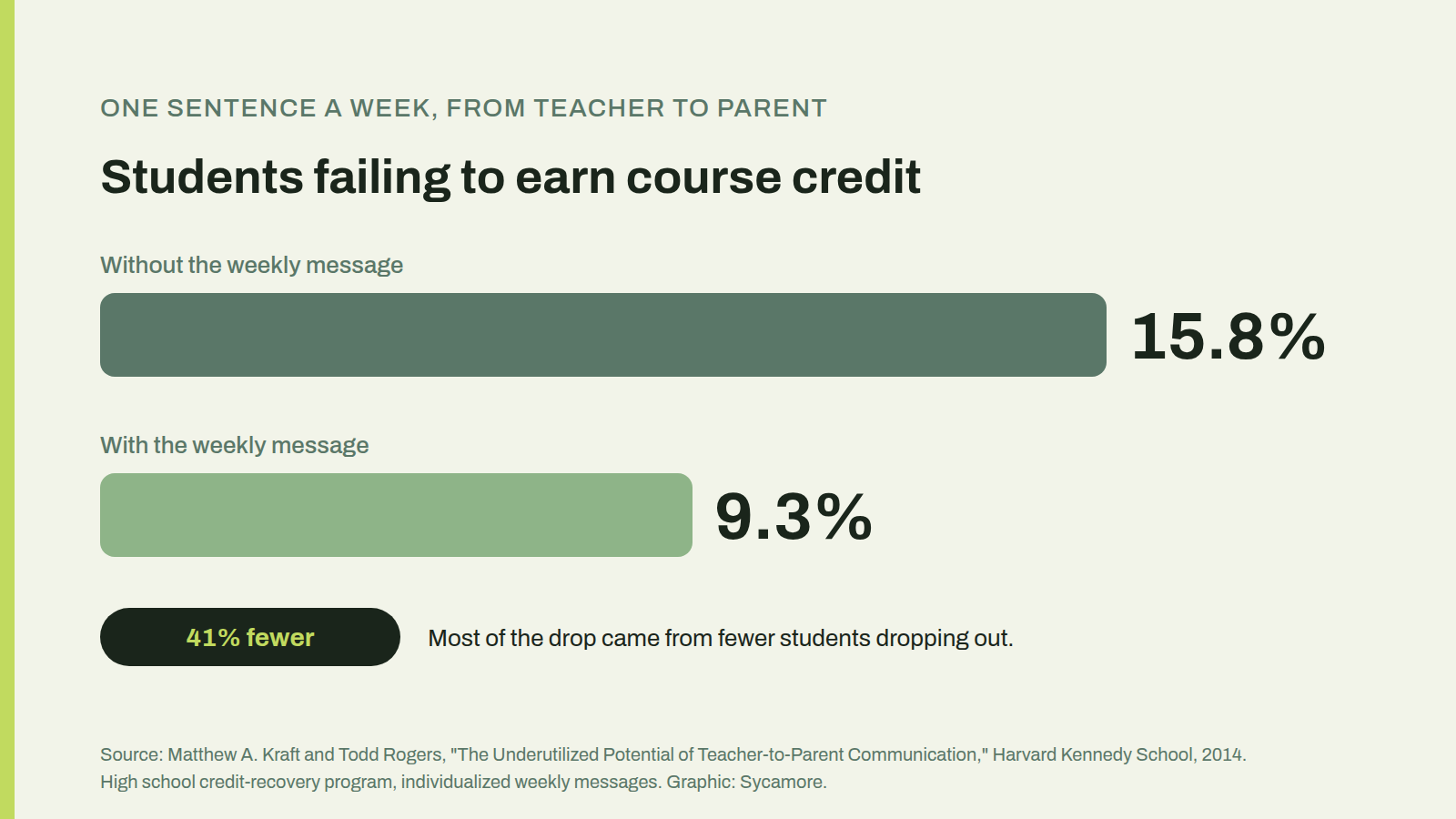
Because they bought them at different times, for different people. The communication tool usually came from the head of school or the marketing office, chosen for newsletters and snow-day texts. The tuition system came from the business manager, chosen for payment plans and aid. Each one was a reasonable decision. Together they mean a parent with two kids gets the field trip reminder in one app, pays for it in another, and checks whether the tuition draft went through on a website they last logged into in August.
Families notice. Almost every parent has the device for this: 91 percent of U.S. adults own a smartphone, according to Pew Research Center’s 2025 survey. What they don’t have is patience for four logins, and the business office is usually the one that hears about it.
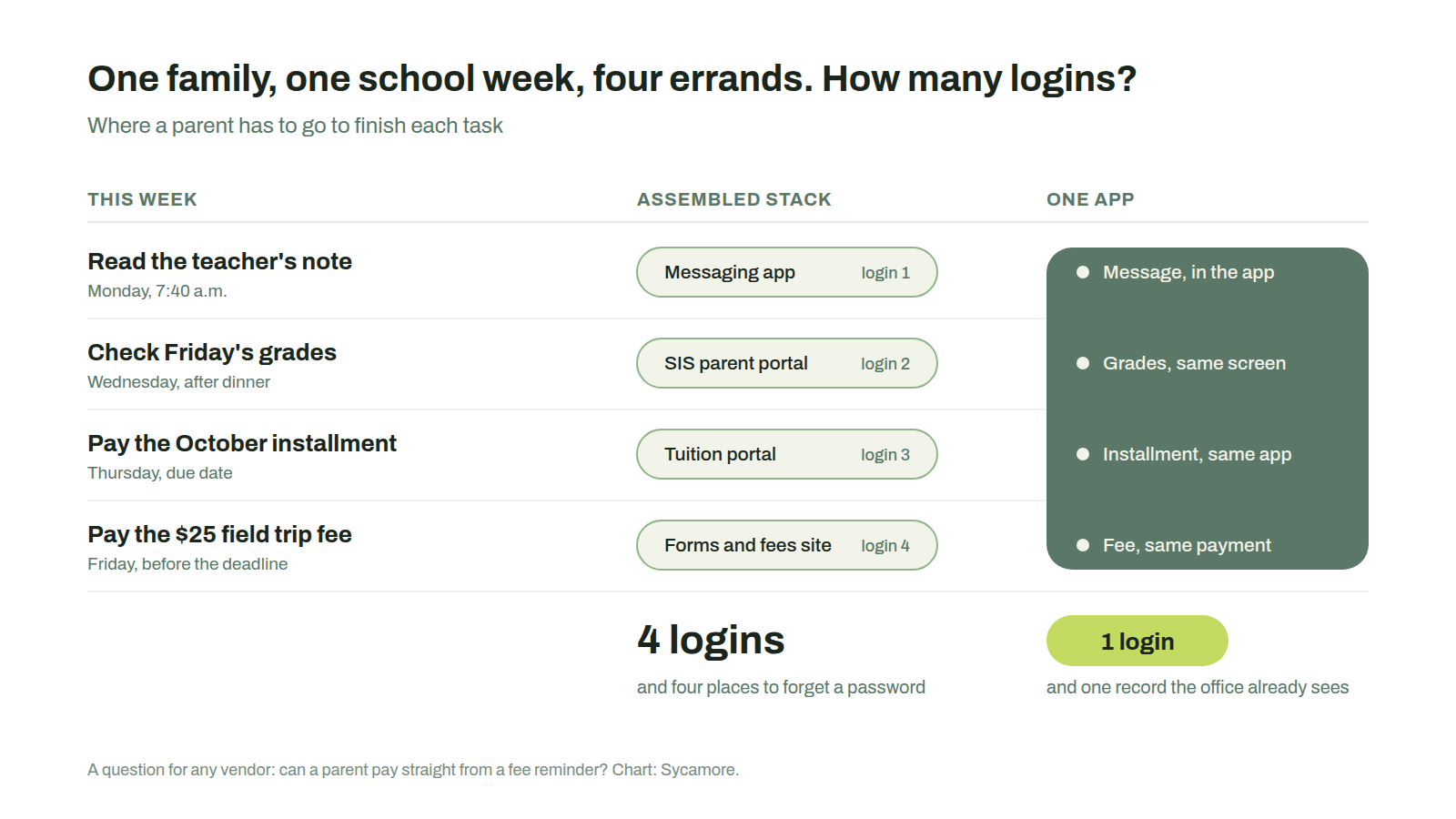
There’s a business reason, too, and it isn’t only convenience. Messages move behavior. In a field experiment by Matthew Kraft and Todd Rogers at Harvard, teachers in a high school credit-recovery program sent parents one individualized sentence a week. The share of students who failed to earn course credit fell from 15.8 percent to 9.3 percent, mostly because fewer students dropped out. That study was about grades, not tuition, but the mechanism is the same one a business office relies on: a short, specific note, delivered where the parent already looks, gets acted on. A reminder sent from one app that asks the parent to go pay in another loses some of that.
Most feature grids for school administration software list forty checkboxes. These six are the ones that actually separate the platforms when the job is talking to families and collecting from them.
One login for the message and the bill. If the reminder and the payment live in different places, the parent has to make the jump, and some won’t. Ask the vendor how a parent gets from the reminder to the payment.
The balance sits next to the grades. Parents open the app for grades and attendance far more often than they open it to pay. When the balance is on that same screen, overdue accounts get noticed in September instead of December.
The school decides who pays the processing fee. This one matters more than any other item on the list, and it’s the one most vendors gloss over. On Sycamore Payments, a card costs 2.9 percent plus 30 cents to the network and a 1 percent Sycamore convenience fee, so 3.9 percent plus 30 cents in all; ACH costs 0.8 percent to the bank, capped at $5, plus the same 1 percent. The school can absorb the fee, pass it to families, or split it down the middle, and it can set cards and ACH differently. Many schools cover ACH and pass card fees along.
Small fees count, not just tuition. Lunch, field trips, aftercare, uniforms, the spring musical. The flat 30 cents on a card matters more on a $10 lunch top-up than on a $12,000 tuition payment. Four separate $10 card payments cost $2.76 in fees; one $40 payment costs $1.86. An app that lets a parent pay several line items at once, which Sycamore’s does, quietly saves families money all year.
Messages reach the right people. Email, text, and push, sent to one class, one grade, one team, or the whole school, with the right guardians on each list. Ask how the platform handles a family with two households, and who gets the bill versus who gets the newsletter.
Payments post themselves. When a parent pays from the couch at 10 p.m., the payment should be on the student’s ledger before anyone in the office arrives, with a receipt already sent. If someone has to export a file from the payment site and import it into the SIS, you’ve bought two systems.
Here’s how the platforms private schools ask us about most often line up on those criteria. We grouped them by what they were built to do first, because that explains most of the differences.
| Platform | Built first for | Parent messaging | Tuition and fee payments | Same app for both? | Best fit |
|---|---|---|---|---|---|
| Sycamore | Private K-12 SIS with native payments | Email, SMS, and push to families, classes, or groups; messages in the parent app | Native; plans, autopay, card and ACH; school picks who pays fees | Yes, one login on iOS and Android | Private and faith-based schools, about 50 to 1,200 students |
| FACTS | Tuition management | School-branded Family App with messaging and alerts | Native and mature; in-app payments when the school bills through FACTS | Yes, if billing runs through FACTS | Faith-based schools already on FACTS Tuition |
| Blackbaud K-12 | A family of school products | Across the SIS and portal products | Tuition Management (formerly Smart Tuition), with its own payer enrollment | Usually two places | Large independents with development offices |
| Veracross | Configurable independent-school platform | Web portals; many schools add a third-party branded app | Native billing; processing through integrations | Depends on the add-ons | Large independents and boarding schools |
| Gradelink | SIS for small schools | Well-liked app; SMS is a paid add-on | Basic ledger with a third-party processor | Partly | Schools under about 150 students |
| Alma | Interface-first SIS | Through AlmaNow, a browser-installed app | Native fees module with card and ACH | Yes, in the browser app | Progressive independents with simple tuition |
| SchoolCues | Flat-fee platform for small schools | Unlimited SMS; app rated below the category | Native billing with recurring plans | Yes | Schools under about 75 students |
| ParentSquare | School and district communication | Strong, district-grade | Fees, field trips, and donations; not tuition plans | No, for tuition | A messaging layer on top of another SIS |
| brightwheel, Procare | Childcare centers and preschools | Daily reports and messaging | Childcare billing | Yes, for childcare | Early childhood programs, not K-12 records |
Everything in the table comes from each vendor’s public materials as of October 2026. Features move, so confirm anything you’d decide on.
Sycamore. The parent app shows school messages, attendance, grades, and payments on one screen, on iOS and Android, pulled live from the same database the office uses. Families can pay one fee or everything at once, filter charges by child, keep a surplus balance for incidentals, and pull a statement at tax time. Payment plans and autopay come from accounting, aid flows into billing, and cafeteria balances bill through the same account. Tuition refund protection through Vertical Insure is available at enrollment. The school can show its own logo in the app instead of ours. Pricing is published at $4 per student per month with every module included.
FACTS built its name on tuition, and the payments side is as mature as anything in the category. The FACTS Family App is a customizable, school-branded app with grades, attendance, messaging, alerts, and forms, and it takes tuition and incidental payments when the school bills through FACTS. Where schools feel the seams is behind the app: the SIS, enrollment, and financial products were built at different times and are quoted separately, and fee handling is less flexible than ours.
With Blackbaud, a parent usually meets two front doors. School information comes through the SIS and portal side; tuition runs through Blackbaud Tuition Management, which has its own payer enrollment. Both are capable. Families with children at more than one Blackbaud school report needing separate logins. If your advancement office lives in Raiser’s Edge NXT, that’s often the deciding factor, and it has little to do with parents.
Veracross bills natively and gives families thorough web portals. The mobile side is where many schools add a separate branded app from a partner, and card and ACH processing also run through integrations, so the parent’s experience depends on which partners the school picks. That’s a reasonable setup for a large independent school with a Veracross administrator on staff. It’s a lot of moving parts for a 250-student day school.
Gradelink has a parent app families like and support that’s hard to beat. Payments run through a third-party processor against a basic ledger, which is fine when tuition is simple, and texting is a paid add-on. Alma has a native fees module and a clean interface, but its parent experience is a progressive web app families install from the browser, and some never find it. SchoolCues covers billing, recurring plans, and unlimited SMS for a flat monthly fee, which is hard to beat at 40 students; its app is rated well below the category.
Not well, and they don’t claim to. Brightwheel and Procare are good at what they’re built for: check-in and check-out, daily reports with photos, ratios, and childcare billing for centers and preschools. A K-12 school needs things those tools don’t carry, such as a gradebook, report cards and transcripts, course schedules, re-enrollment contracts, and aid on a tuition plan that runs for years. If you run a preschool alongside a K-12 school, the better question is whether your K-12 platform can bill the early childhood program on the same family account, so a parent with a four-year-old and a nine-year-old gets one statement.
The same goes for communication-only family engagement tools like ParentSquare, ClassDojo, or Remind. They can be very good at reaching parents. They just stop at the money, which means you’ll still need school payment processing somewhere else, and you’re back to two apps.

Four questions cover most of what matters here.
If the answers line up, the rest of the education technology comparison gets a lot shorter.
What is the best education software for parent communication and payments?
For private K-12 schools, it’s education management software that puts messaging, grades, attendance, and payments in one parent app on top of one student record. Sycamore does this natively. FACTS does it when the school also bills through FACTS. Most other platforms split the two jobs across products, portals, or partners.
Do private schools need a separate parent communication app?
Not if the SIS sends email, text, and push messages to the right families and shows them in the same app where parents pay. A separate app makes sense mainly for districts or schools that want a communication layer over an SIS they can’t change.
Who pays the processing fees on school payments?
It depends on the platform and the school’s choice. On Sycamore the school decides: it can absorb the fee, pass it to families, or split it, and it can treat cards and ACH differently. Card fees on Sycamore are 3.9 percent plus 30 cents, and ACH is 1.8 percent with the bank portion capped at $5.
Can brightwheel or Procare work for a K-12 school?
No. They’re built for childcare and preschool, and they don’t handle gradebooks, transcripts, or multi-year tuition plans.
Is ACH or card better for school payments?
ACH for tuition, almost always, because the bank portion is capped. Cards are fine for small fees, especially when the app lets parents combine several charges into one payment so the 30-cent charge applies once.
How long does it take families to adopt a new parent app?
It depends more on the rollout than the app. Send the download link with the first bill, pick a date to retire the old channels, and say so in every message until then. Running two apps side by side for a semester mostly teaches families to ignore one of them.
Ally Christofferson Pogue is an Account Executive and Onboarding Specialist at Sycamore, where she sets up the parent app, communication, and Sycamore Payments for schools joining the platform. To walk through how your families would message, check grades, and pay in one place, book time with Ally or call 1-866-757-5401.
Parents don’t think of the field trip text and the tuition bill as two systems. They think of them as the school. Sycamore has served private and faith-based K-12 schools since 2001 and supports more than 100,000 students in over 40 countries. Request a demo to see what your families would see.
Ten affordable SIS platforms for independent K-12 schools, compared on all-in cost, admissions, enrollment, tuition payments, and the tradeoffs that matter at a small school.
Which K-12 student information systems do U.S. private schools use, and how do their tuition, payment, and aid tools compare? Seven platforms, tuition first.
Which all-in-one school management software actually runs admissions, enrollment, billing, and the SIS on one record for independent K-12 schools, and which only looks like it does.