Academy

How should K-12 schools choose an online training hub for staff? Ten staff training platforms compared on onboarding, compliance, coaching, PD tracking, and price.
Staff training works best when it’s built around the job people actually do. I’m Director of Client Strategy at Sycamore, and one of the platforms below, Sycamore Academy, is ours. Everything we say about the others comes from their own product pages, help docs, and published pricing as of November 2026.
Start by naming the job, because no single platform does all of it well. Most schools need training on their own systems, a compliance library, a way to coach teachers, and a place to keep PD records. Here’s where the main K-12 staff training platforms fit:
The people keep changing. Between the 2020-21 and 2021-22 school years, 12 percent of private school teachers left the profession and another 6 percent moved schools, according to the National Center for Education Statistics. Only 82 percent stayed where they were. Every one of those openings is a new hire who has to learn your gradebook, your attendance routine, and your mandated reporting process, often in August, sometimes in January.
Turnover is expensive, and onboarding is part of the fix. The Learning Policy Institute estimates each teacher departure costs between about $12,000 and $25,000, and notes that new teachers who are mentored and well supported become effective sooner and stay longer.

The format matters too. A March 2026 GAO report, drawing on RAND survey data, found that 67 percent of teachers said collaborative learning with other teachers improved their teaching, compared with about 43 percent for workshops, and teachers rated one-time trainings without follow-up as not useful. Choice helps as well: in a 2025 Gallup and Walton Family Foundation survey, 68 percent of teachers who could choose their workshops called them at least moderately valuable, against 39 percent of those who couldn’t.
Most comparisons of school staff training tools lump everything together, which is how a school ends up buying a compliance library and wondering why teachers still can’t find the report card settings. It helps to split the work into four jobs.
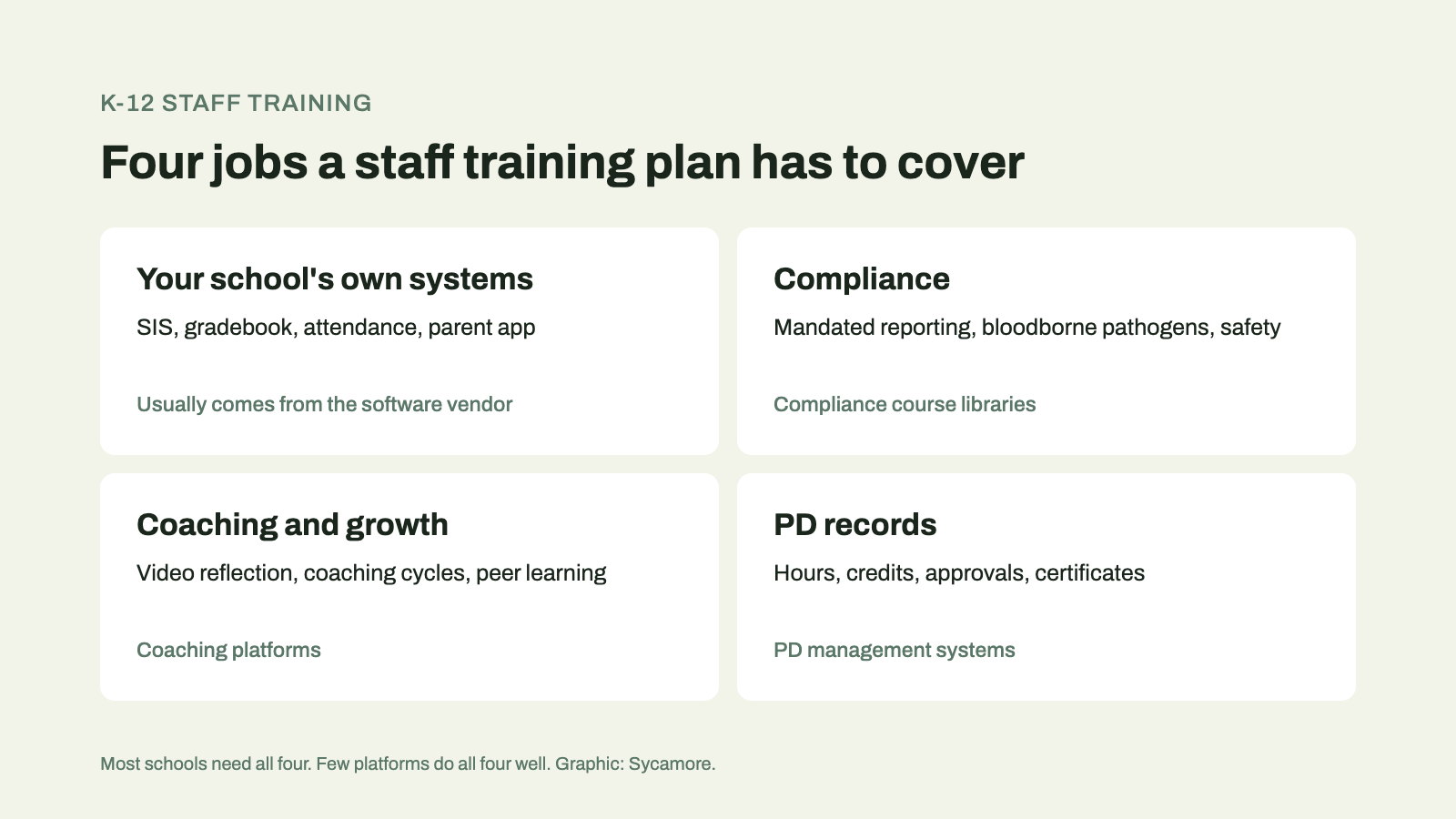
Training on your own systems. How to take attendance, post grades, run report cards, message families, and close out the year in the software you actually use. This is the training new hires need first, and it goes stale fastest, because the software keeps changing. The vendor is usually the only one who can keep it current.
Compliance. The courses your state or insurer requires: mandated reporting, bloodborne pathogens, harassment prevention, school safety. Here you want a maintained library with certificates you can hand an auditor.
Coaching and growth. The instructional side of online professional development, where teachers record a lesson, reflect, and get feedback. This is where the research above says the payoff is.
PD records. Hours, credits, approvals, and transcripts, especially if your teachers hold state licenses that require them.
Learning Forward’s Standards for Professional Learning ask schools to measure the impact of professional learning and to implement and sustain it, not just schedule it. The federal definition of professional development in ESSA points the same way: sustained, intensive, collaborative, job-embedded, not stand-alone one-day workshops. In platform terms, that turns into a short list.
Role-based paths. A secretary and a teacher need different training. A good platform starts each person on the courses for their job instead of handing them the whole catalog.
Short answers for the middle of the workday. Onboarding courses matter, but most training happens when someone is stuck on a task at 2 p.m. Look for short videos and a search that finds the answer fast.
Proof it landed. Quizzes, completion tracking, and certificates, so a division head can see who finished and who didn’t, without chasing anyone.
Single sign-on. Staff shouldn’t need another password. If the training sits behind the same login as the system it teaches, people actually open it.
Content someone else keeps current. Building your own courses sounds flexible until the software changes and every screenshot is wrong. Ask who updates the content, and how often.
A cost model you can predict. Per-user pricing, per-teacher tiers, and “contact sales” all add up differently once you count every staff member, including substitutes and aides.
Here’s how ten platforms line up, based on each vendor’s own materials as of November 2026. “Quote” means the vendor doesn’t publish a price.
| Platform | Built for | What’s inside | Tracking | Pricing |
|---|---|---|---|---|
| Sycamore Academy | Training on Sycamore, for every role | 100+ courses in 12 role catalogs; short help videos | Quizzes; progress by course | Included for Sycamore schools |
| PowerSchool University PD+ | Training on PowerSchool products | Self-paced courses and video tutorials; role-based paths | Not published | Quote (paid subscription) |
| PowerSchool Professional Learning | PD management | Centralize and manage professional learning | PD tracking | Quote |
| Frontline Professional Growth | PD management for districts | Events, online courses, credit, approvals, evaluations | Credit and transcripts | Quote |
| Frontline PLM Foundation | Charter and independent schools | Prebuilt state-aligned compliance courses | Audit-ready reports; certificates | Quote |
| Vector Solutions | K-12 compliance | Course library: mandated reporting, bloodborne pathogens, cybersecurity | Management system | Quote |
| Edthena | Video coaching | Coaching cycles, AI coach, 110 coaching topics | PD clock hours | Published: from $1,980/yr for 20 teachers |
| Sibme | Video and evidence coaching | Coaching tools; on-demand library on Enterprise | Not published | Published: from $25/mo billed annually; Enterprise by quote |
| Kalpa | PD tracking | Registration, attendance, outside PD, requirements | Hours toward requirements | Quote |
| TalentLMS | Any organization | Course builder; add-on library of 1,000+ courses | Course completion | Published: free for 5 users; from $119/mo |
iSpring LMS belongs in the same group as TalentLMS: a general learning management system with authoring tools built in, from $3.58 per active user per month billed annually. Neither is designed for schools, which cuts both ways. They’re flexible, and every course is yours to build.
Sycamore Academy launched in January 2026 and passed 100 courses within its first eight months. It’s organized the way schools are: twelve role catalogs, including teachers, grading, secretaries, principals, finance, and the nurse’s office, plus a library of short reference videos for one-answer moments. Courses break into lessons and topics, most have quizzes, and progress is tracked per course, so someone who gets pulled away picks up where they left off. Academy is only for schools that use Sycamore. Staff log in to their school’s Sycamore site and open Academy from there, and the login carries over. It teaches Sycamore. It isn’t a compliance library or a coaching tool, and we’d tell you to pair it with one.
PowerSchool sells two different things here. PowerSchool University PD+ is a paid subscription for learning PowerSchool’s own products, with self-paced courses, video tutorials, and role-based learning paths. PowerSchool Professional Learning is a PD management product for organizing and tracking professional learning more broadly. If you run PowerSchool, the first one is the closest match to what Academy does for Sycamore schools. Neither publishes a price.
Frontline Professional Growth is built to plan, deliver, and track professional learning for every role in a district, with events, online courses, credit, approvals, and evaluations. Its PLM Foundation product is the one independent schools should look at first: Frontline describes it as purpose-built for charter and independent schools, with prebuilt state-aligned courses on mandated reporting, harassment prevention, school safety, and trauma-informed practice, plus audit-ready reports and certificates.
Vector Solutions is the compliance specialist on this list. Its K-12 library covers bloodborne pathogens, child abuse and mandatory reporting, cybersecurity awareness, positive school climate, and courses for bus drivers and facilities staff, with a management system around it. If your main worry is the annual compliance checklist, start here.
Both are coaching platforms, and both publish prices, which is rare in this category. Edthena centers on video coaching and an AI coach with 110 coaching topics, and teachers can earn PD clock hours for completed coaching cycles; its AI Coach starts at $1,980 a year for up to 20 teachers. Sibme calls itself an instructional evidence platform, with a $25-a-month Campus Leader plan billed annually and custom pricing for its Enterprise tier, which adds single sign-on, Canvas integration, and an on-demand library.
Kalpa tracks professional development rather than delivering it: registration, attendance, outside PD, and hours toward requirements, with ready-made reports. It’s been around since 1997 and is aimed at districts. Useful if your problem is records, not content.
These are general learning management systems that schools borrow. TalentLMS has a free plan for up to five users and paid plans from $119 a month, with single sign-on from its Core plan and an add-on library of more than 1,000 ready-made courses. iSpring LMS starts at $3.58 per active user per month and comes with authoring tools. Both work well if you have someone with time to build and maintain courses.
Plenty of schools already pay for one of these, so it’s tempting to run staff training there too. It can work for a small school. But neither Instructure nor Google positions its K-12 product for staff training, so completion tracking, certificates, and onboarding paths are yours to set up and maintain.
It’s software that delivers and tracks training for school employees: onboarding on the school’s systems, required compliance courses, coaching, and professional development records. Some platforms cover one of those jobs, a few cover two or three, and very few do all of them well.
Yes, and small schools often do. The catch is that you build and maintain everything yourself, including completion tracking and certificates, because neither product is set up for staff training out of the box.
Usually. Compliance courses have to match state requirements and produce records an auditor will accept, which is a specialty. Libraries like Vector Solutions and Frontline’s PLM Foundation exist for that reason.
The vendor, ideally, because the vendor is the one changing the software. Ask whether training is included in the subscription or sold separately.
No. Academy is available only to schools that use Sycamore. Staff log in to their school’s Sycamore site and open Academy from there.
Shorter and more often beats one long day. Research reviewed by the GAO found no link between the length of professional development and its effect, while follow-up and collaboration mattered more.
Michaela Lamb, M.Ed., is Director of Client Strategy at Sycamore, where she works with independent and faith-based schools on platform fit. She has worked in K-12 schools herself, including building high school master schedules by hand, so she knows how little spare time a school day leaves for training. To talk through how your staff would learn Sycamore, book time with Michaela or call Client Strategy at +1 (402) 442-1499.
If you’d like to see how Sycamore schools train their teams, request a demo and we’ll walk through Academy with you.
What’s the best campus management software for multi-campus schools and school networks? Seven platforms compared on centralized enrollment, tuition, family accounts, and network reporting.
Which campus management software handles academic scheduling and grade reporting together? Nine K-12 platforms compared on master scheduling, gradebooks, report cards, transcripts, and price.
A practical education software evaluation guide for independent school leaders: how to judge teacher adoption, usability, training, interoperability, and long-term fit before you sign.