Guide

A practical education software evaluation guide for independent school leaders: how to judge teacher adoption, usability, training, interoperability, and long-term fit before you sign.
Run your education software evaluation through the eyes of the teachers who’ll use the product every day. Put two to four teachers on the evaluation team, have them do real tasks in each platform (take attendance, post a grade, message a family), pilot the finalist for a full grading period with the same training they’d actually get, and score every option on five lenses: teacher adoption, usability, training needs, interoperability, and long-term fit. A platform that wins the feature comparison and loses the teachers will cost you more than it saves. The rest of this guide shows how to test each lens and what good looks like.
A quick note on where I sit. I lead product and quality assurance at Sycamore, so a lot of my week goes to finding the spots where software slows people down before a release reaches schools. Sycamore is one of the platforms you might put through this process, and the checklist below works on us exactly the way it works on everyone else.
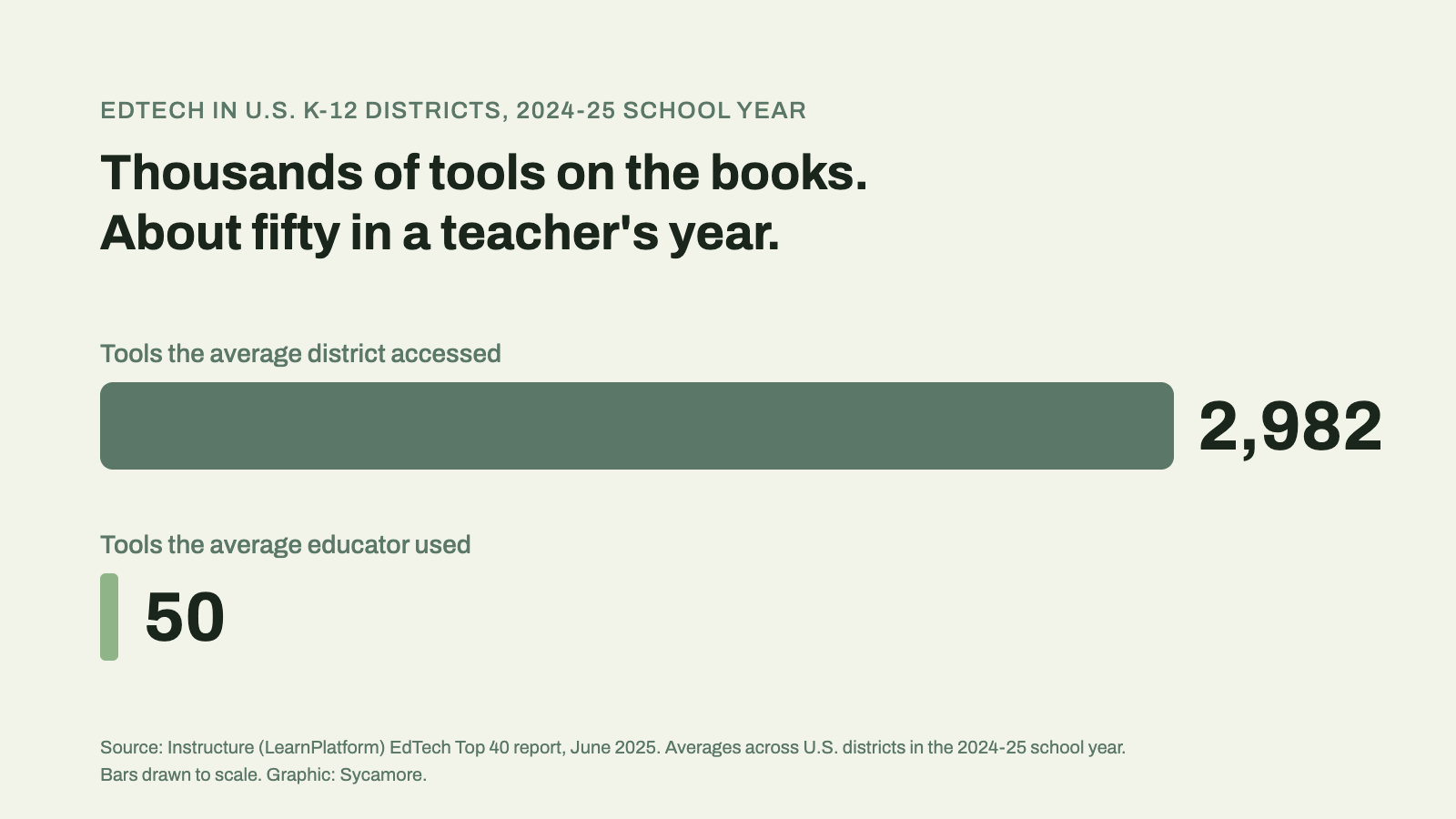
Because schools buy far more software than teachers can absorb. In the 2024-25 school year the average U.S. district accessed 2,982 distinct edtech tools, while the average educator used about 50, according to Instructure’s EdTech Top 40 report. A year later the district figure had crept to an average of 3,001 tools. Those are public-district numbers, and an independent school runs a much smaller stack, but the squeeze on a teacher’s week is the same.
Plenty of what gets bought never gets used. A March 2026 report from Digital Promise and the Center for Outcomes Based Contracting describes more than 65 percent of purchased edtech licenses going unused as the norm. And teachers don’t have spare hours to close that gap. In RAND’s 2025 State of the American Teacher survey, teachers reported working 49 hours a week against 39 contracted hours, and about a quarter ranked administrative work outside teaching among their top three sources of stress.
The Colorado Department of Education puts the problem in one sentence in its curriculum adoption guidance: if teachers don’t know how to use their materials, they won’t use them. That’s about curriculum, but it holds for an SIS, a gradebook, or a parent app. Adoption isn’t a phase after the purchase. It’s the thing you’re buying.
Smaller than you’d think, and more mixed. Digital Promise’s procurement framework recommends a cross-departmental team that weighs academic quality, privacy, technical fit, and cost together, and the Colorado guidance calls for teachers on the committee from the start. Even vendors say it; Blackbaud’s own implementation guide tells schools to bring teacher representatives into selection.
For an independent school, a workable team looks like this: a division head or academic dean who owns the decision, two to four classroom teachers from different divisions (include one who’s openly skeptical of new technology), the registrar or office manager who’ll live in the system all day, someone from the business office, and whoever handles technology. Five to eight people. Teachers don’t need to sit through every sales call. They need time to do real work in the product and a scored way to say what they found.
Feature lists tell you what a platform can do. These five tell you what your teachers will actually do with it.
The Learning Accelerator frames edtech evaluation around four questions that work well here. Engagement: are all the intended users actually in the tool? Adoption: are they using it as intended? Impact: is it moving the outcome you bought it for? Satisfaction: do the people using it find it worth the effort? During a pilot, you can answer the first two from the platform’s own usage reports and the last two from a short survey and a conversation. Ask every vendor up front what usage data you’ll be able to see, at the school level and by teacher.
Skip the guided tour and time the work. Give each teacher on the team the same three tasks in every platform: take attendance for a class, enter a grade for an assignment and see it on the student’s record, and send a message to one family. Note how long each takes and where people got stuck. You’ll learn more in twenty minutes than in an hour of slides.
AASA, the school superintendents’ association, has published a cruder filter that still works: teachers watch a five-minute demo and say whether they’d use the product, and anything that gets mostly “no” is out. It’s from 2017, and the instinct behind it hasn’t aged. While you’re at it, ask whether the product meets WCAG 2.1 AA accessibility, and check it on a phone, since that’s where a lot of attendance and parent messaging now happens.
Here the Colorado guidance is unusually specific. Any pilot should include the same training teachers would get if the school adopted the product. Training should be job-embedded and scheduled into the workday, repeated rather than one-and-done, and someone should track who has completed it. It also calls out onboarding for staff who join mid-year, which is easy to forget until a new teacher starts in January.
So ask each vendor three questions. What training is included in the subscription, and what’s quoted separately? Is it organized by role, so a teacher sees the teacher material instead of the whole platform? Can you see who has finished it? A vendor that answers with “we’ll do a webinar at launch” is telling you the training plan is yours to build.

Teachers adopt software faster when it doesn’t add another place to enter the same thing. Map where a grade travels today, from the learning platform to the gradebook to the report card to the parent’s phone, and count the times someone retypes it. Then ask each vendor how its product closes those gaps. Standards help: 1EdTech’s OneRoster exists so systems can exchange rosters, course materials, and grades. So do direct integrations with tools like Google Classroom and Clever. Ask for the actual list of integrations, who maintains them, and what happens to your data when one breaks.
The strongest answer is fewer handoffs to begin with. When attendance, the gradebook, report cards, and the parent app all read the same student record, there’s no sync to break.
Long-term fit is part contract, part data, part vendor. On the contract, look at the term, the renewal increase, and how you leave. On data, the U.S. Department of Education’s Privacy Technical Assistance Center has guidance on vendor agreements covering data ownership, deletion, and marketing limits, and the Student Data Privacy Consortium maintains a National Data Privacy Agreement that many vendors already sign. One nuance for independent schools: FERPA applies to schools that receive funds under Department of Education programs, so it may not bind you legally. Use it as the benchmark anyway. Your families expect it.
On the vendor, ask how long they’ve served schools like yours, what’s on the roadmap for the next year, and who picks up the phone when something breaks in October.
Score each lens from 1 to 5 for every platform on your shortlist. Weight teacher adoption and usability more heavily if the main users are faculty, and long-term fit more heavily if you’re replacing a system you’ve outgrown.
| Lens | What to ask | What good looks like | Red flag |
|---|---|---|---|
| Teacher adoption | What usage data will we see during the pilot and after launch? | Usage by teacher and by feature, available to the school without a support ticket | “We can pull that for you at renewal” |
| Usability | Can a teacher take attendance, post a grade, and message a family without help? | All three done in a few minutes on the first try, on a laptop and a phone | The demo only works when the salesperson drives |
| Training needs | What training is included, is it by role, and can we see who finished? | Role-based, on-demand training included in the price, with completion tracking | Training quoted per day or per session |
| Interoperability | Where does a grade get retyped today, and does this remove it? | One record from gradebook to report card to parent view, plus standard integrations | A nightly CSV export someone has to watch |
| Long-term fit | How do we leave, and what happens to our data? | Clear term, capped renewals, signed privacy agreement, full data export | Auto-renewals and a vague answer on data deletion |
Digital Promise’s advice is to start with a smaller pilot with clearly defined outcomes, and to log why each tool was approved or rejected so the next decision doesn’t start from scratch. That second part matters more than it sounds. Independent schools change software rarely, and the people who ran the last evaluation have often moved on by the next one.
A sequence that works: settle privacy and contract terms first, so nobody falls in love with a product you can’t sign. Then let the evaluation team use the product on their own, with real tasks, before any students or families see it. Then run it with a small group of classes for a full grading period, with the same training everyone would get. Finish with a short review against the outcomes you wrote down at the start. SchoolAmplified, a vendor writing about AI tools for districts, suggests a stop condition for each phase, and that’s worth borrowing: decide in advance what result would end the pilot early.
Two things kill pilots. The first is running one in May, when teachers are closing out the year and can’t give it real attention. The second is piloting without the training, then blaming the product when people struggle. Fall and early spring both work better than late spring.
Since we’re on everyone’s shortlist eventually, here’s how Sycamore answers the five lenses, so you can check it in a demo rather than take our word for it.
The gradebook supports standards-based or traditional grading, with custom report cards by division, and it sits on the same student record as attendance, the parent app, admissions, and tuition. Teachers who already work in Google Classroom keep doing that; Sycamore integrates with it, and with Clever. Training comes through Sycamore Academy, which launched in January 2026 and had 108 courses by September, organized into role catalogs (including one for teachers and one for grading) with quizzes and per-course progress tracking, so an administrator can see who’s finished. Clients reach it through single sign-on, and it’s included in the price along with unlimited U.S.-based support. Sycamore School is $4 per student per month, published.
Where to push us: ask to see the teacher catalog in Academy, ask how a mid-year hire gets onboarded, and run the three timed tasks above the same way you would with anyone else.
It’s a structured review of a school platform before you buy or renew it. A good one looks past the feature list at five things: whether teachers will adopt it, how usable it is for everyday tasks, how much training it needs, how it connects to the systems you already run, and whether it fits the school for the long term.
Long enough to cover a full cycle of the work the software supports. For a gradebook, that usually means at least one grading period with progress reports going home. A two-week trial tells you whether people can log in. It doesn’t tell you whether report cards come out right.
For most independent schools, two to four is plenty, drawn from different divisions and at least one of them skeptical of new technology. Their job is to test real tasks and report back, not to sit through every vendor call.
Often not. FERPA applies to schools that receive funds under U.S. Department of Education programs, and many independent schools don’t. It’s still the best available benchmark for vendor contracts, and families tend to assume you meet it.
Usually because it costs them time they don’t have.
They should get a real voice, and in practice a veto on usability. The final decision also rests on cost, data, and fit with the business office, so most schools give teachers a scored section of the evaluation rather than a straight vote.
Kimberly McLemore is VP of Product and Quality Assurance at Sycamore. She oversees what goes into the platform and the testing every release goes through before it reaches schools. To see how Sycamore holds up against your own evaluation checklist, request a demo or call Client Strategy at +1 (402) 442-1499.
The best software decision your school makes this year might be the one your teachers barely notice, because it gave them time back instead of taking it. If you’d like to put Sycamore through the scorecard, request a demo.
Which campus management software handles academic scheduling and grade reporting together? Nine K-12 platforms compared on master scheduling, gradebooks, report cards, transcripts, and price.
Ten affordable SIS platforms for independent K-12 schools, compared on all-in cost, admissions, enrollment, tuition payments, and the tradeoffs that matter at a small school.
Which K-12 student information systems do U.S. private schools use, and how do their tuition, payment, and aid tools compare? Seven platforms, tuition first.