Guide

Which student information system integrates tightly with Google Classroom? Ten SIS compared on Google partner status, what syncs, and required licenses.
I advise Sycamore, and it’s one of the systems compared here. Everything below about the others comes from what Google and each vendor publish about their own integrations as of November 2026.
Student information systems connect to Google Classroom in two main ways. Some use Google’s own built-in SIS integration, which is open only to Google’s partner vendors and requires every teacher to have a paid Google Workspace for Education Plus or Teaching and Learning Upgrade license. Others, Sycamore included, build their own integration. Here’s how the main options fit:
Classroom is where the work happens, and the SIS is where the record lives. Google said in September 2024 that more than 150 million teachers and students use Classroom and Assignments. When the two systems don’t talk, teachers grade in one place and retype grades in another, and every schedule change means fixing rosters by hand in both.
The fix isn’t new standards. In CoSN’s 2025 survey of school technology leaders, the number one barrier to improving interoperability is not the lack of agreed-upon standards. Standards like OneRoster exist. The question is whether your student information system actually uses them, and what it does with the data once it arrives.

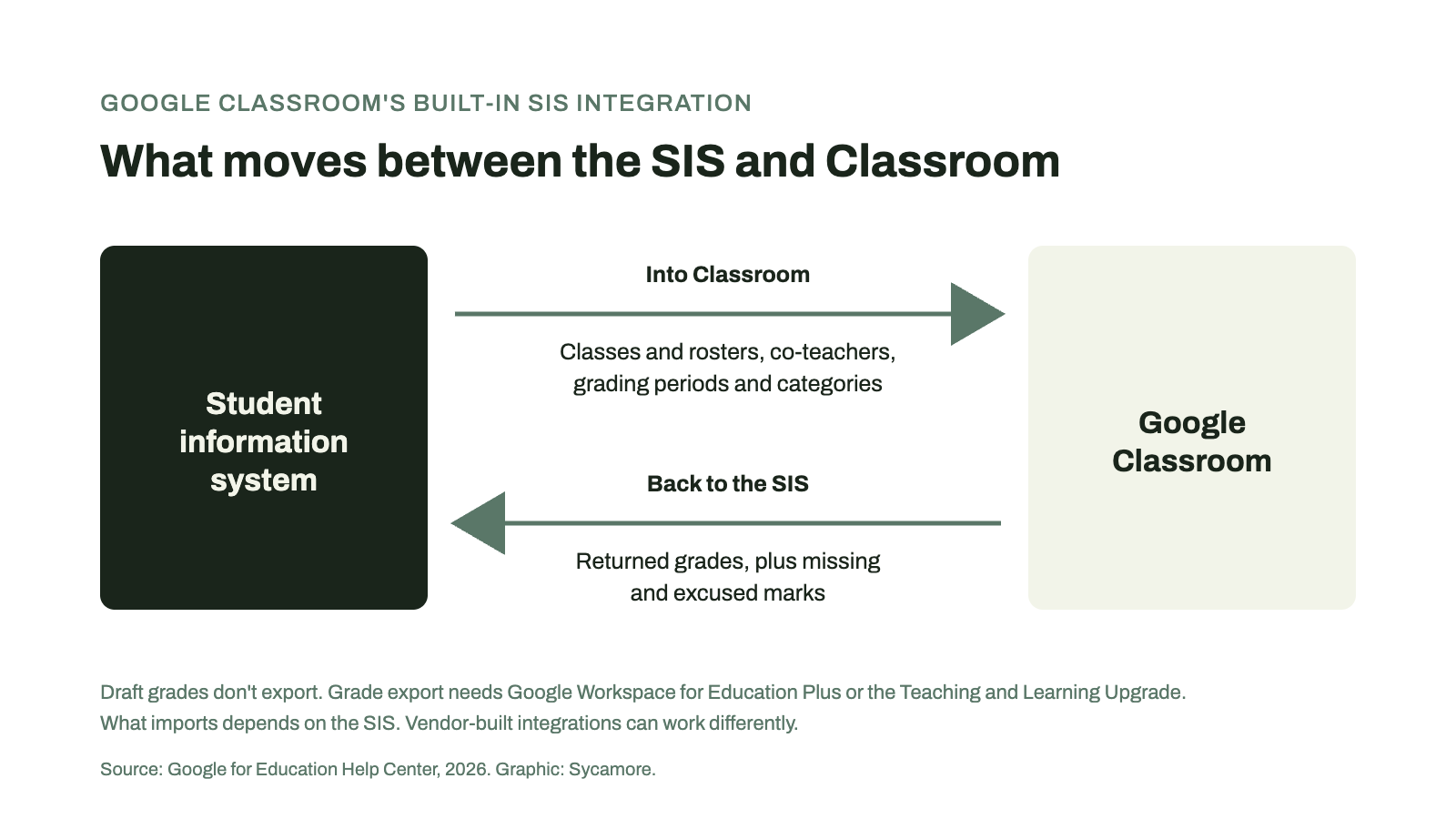
1. Google’s built-in SIS integration. An administrator connects a partner SIS through the OneRoster API. Teachers link each class once, and returned grades export to the SIS gradebook, along with items marked missing or excused, which Google added in October 2024. Draft grades don’t export, and classwork needs a due date inside the current grading period. On the way in, Classroom can import students, co-teachers, grading periods, and grade categories, and since August 2024 it can create classes from SIS data, though what you can import depends on the SIS. Since July 2024, grade export requires Education Plus or the Teaching and Learning Upgrade for each teacher.
2. An integration the SIS vendor builds. Some vendors connect to Classroom through Google’s APIs on their own, outside Google’s partner program. What these integrations cover varies from one vendor to the next.
3. Rostering services and middleware. Clever can create Classroom classes from SIS sections and keep enrollment current, for schools on Google Workspace for Education Standard or Plus; teacher changes in Classroom aren’t written back to the SIS. Third-party tools such as Edlink can also move grades between systems for a fee.
Direction. Does data flow from the SIS into Classroom, from Classroom into the SIS, or both? Most grade sync runs one way, from Classroom to the SIS.
What actually syncs. Rosters and co-teachers are table stakes. Grading periods, categories, assignments, and grades are where integrations differ. Ask whether only returned grades come across, and what happens to a grade that’s later changed.
Licenses on both sides. Google’s grade export needs a paid Google license. Some SIS vendors also require their own add-on license. Price both before you compare.
Teacher setup. Linking each class once is very different from mapping every gradesheet by hand each term. Ask a teacher to do it, not a sales engineer.
Schedule changes. When a student changes sections mid-term, does Classroom follow, and do the grades land in the right place? We cover the schedule side in our scheduling and grades comparison.
The rest of your stack. If some teachers use Canvas, Schoology, or Microsoft Teams, check those integrations too, plus OneRoster certification and single sign-on through Clever or ClassLink.
Here’s what each vendor and Google publish, as of November 2026.
| SIS | Google partner? | What syncs with Classroom | Extra licenses |
|---|---|---|---|
| Sycamore | No; Sycamore’s own integration | Direct Google Classroom integration | None; included in the licensing fee |
| PowerSchool SIS | Yes | Rosters, co-teachers, grading categories in; grades back to PowerTeacher Pro | Google Education Plus or Teaching and Learning |
| Blackbaud | Yes | Rosters, co-teachers, grading periods and categories in; grades back | Google Education Plus or Teaching and Learning |
| Infinite Campus | Yes | Assignment scores back to the Campus Grade Book | Campus Learning license |
| Skyward | Yes | Grades back to the Skyward Gradebook | LMS API or OneRoster API license |
| Alma | No; Alma’s own integration | Rosters, teachers, assignments, and grades | Not published |
| Gradelink | No; Gradelink’s own integration | Assignments and returned grades into Gradelink, one way, mapped by each teacher | Not published |
| Aeries | No; Aeries’ own integration | Assignments and returned scores into the Aeries Gradebook, one way | Not published |
| Veracross | No | Through its open API and third-party tools | Not published |
| FACTS SIS | No | Lists a Google Classroom integration; details not published | Not published |
Sycamore integrates directly with Google Classroom, so teachers can keep assigning and grading where they already work while the school runs attendance, report cards, transcripts, and family communication from Sycamore’s student information system. Rostering also works through Clever, and Sycamore schools get a dedicated “Setting Up Google Classroom” course in Sycamore Academy. The integration is included in Sycamore’s licensing fee, so there’s no add-on to buy on our side. Sycamore isn’t on Google’s partner list for Classroom’s built-in grade export, so ask for a walkthrough in your demo.
PowerSchool SIS is a Google partner. Teachers can export grades from Classroom to the PowerTeacher Pro gradebook, and Classroom can import rosters, co-teachers, and grading categories. Google recommends version 24.5.1.0 or later, and grade export requires the paid Google license for each teacher.
Blackbaud serves private schools and is a Google partner. Classroom can import rosters, co-teachers, grading periods, and categories from Blackbaud through OneRoster, and grades export from Classroom to the Blackbaud gradebook. As with PowerSchool, grade export requires the paid Google license for each teacher.
Both are Google partners built mostly for public districts, and both put the integration behind an extra license on their side: Campus Learning for Infinite Campus, the LMS API or OneRoster API license for Skyward. Infinite Campus passes assignment scores back into its gradebook.
Alma isn’t on Google’s partner list for the built-in grade export. Its own integration syncs rosters, teachers, assignments, and grades with Classroom.
Both pull Classroom work into their own gradebooks, one way. In Gradelink, an administrator turns on the sync and each teacher signs in with Google and maps gradesheets; only returned grades come across. Aeries imports assignments and returned scores, with an optional nightly import, and scores from Google overwrite existing scores in Aeries.
Veracross lists Google Classroom among the integrations available through its open API, and third-party tools document grade sync from Classroom into Veracross. FACTS lists a Google Classroom integration but doesn’t publish what it syncs. With either, ask for the specifics in writing.
Not fully. Google’s built-in grade export requires each teacher to have a Google Workspace for Education Plus or Teaching and Learning Upgrade license. Some SIS vendors also charge for their side of the connection.
Google’s partner list for its built-in SIS integration includes PowerSchool SIS, Infinite Campus, Skyward, Blackbaud, Follett Aspen, STLink, and Wazzle Gradebook, each with its own requirements. Other systems connect through integrations they build themselves.
No. With Google’s built-in integration, only returned grades export, along with items marked missing or excused.
A 1EdTech standard that lets school systems securely exchange rosters, course materials, and grades. Google’s built-in SIS integration runs on it.
For most schools, yes, in practice. It handles assignments, feedback, and grading, while the student information system keeps the official record: attendance, report cards, and transcripts.
Not necessarily. Clever is one way to create and update Classroom rosters from the SIS. Some SIS integrations handle rosters directly.
Dr. Ryan Lowe is a fintech leader and an advisor to Sycamore, where he works on payments and growth. To see how Sycamore would fit alongside your school’s Google Classroom setup, request a demo or call Client Strategy at +1 (402) 442-1499.
If you’d like to see the Google Classroom integration in a demo, request one here.
How should K-12 schools choose an online training hub for staff? Ten staff training platforms compared on onboarding, compliance, coaching, PD tracking, and price.
What’s the best campus management software for multi-campus schools and school networks? Seven platforms compared on centralized enrollment, tuition, family accounts, and network reporting.
Which campus management software handles academic scheduling and grade reporting together? Nine K-12 platforms compared on master scheduling, gradebooks, report cards, transcripts, and price.