Products
Products
Discover our comprehensive, user-friendly products that streamline school management and empower schools to operate more efficiently.
View Our Products➝
Sycamore School
(K-12 SIS)
Discover our product for independent K-12 schools.
Sycamore Payments
Simple tuition and fee payments.
Tuition Refund Protection
Tuition protection for families.
Sycamore Parent App
Explore our mobile app for parents & students.
Parent App Download
Access grades and payments on the go.
Sycamore Campus (Higher Ed)
Enable powerful tools for colleges or trade schools.
Sycamore Academy
Access role-based training for your school team.
Solutions
Solutions
Discover our comprehensive, user-friendly solutions that streamline school management and empower schools to operate more efficiently.
View Our Solutions ➝
Multi-Site Networks
Manage multiple schools in one system.
International Schools
Flexible tools for global school operations.
Independent K-12
Discover our solutions for private K-12 schools.
Financial Management
Efficient financial tools for managing school finances.
Sycamore School Websites
Fast modern websites built custom for your school
Fintech in Private Schools
Smarter payments and financial workflows.
Sycamore for Christian Schools
All-in-one tools for mission-driven schools.
For Catholic Schools & Dioceses
One platform for schools and diocesan networks.
Sycamore for Lutheran Schools
Teacher-first tools for Lutheran school communities.
About
About
Discover our comprehensive, user-friendly solutions that streamline school management and empower schools to operate more efficiently.
About Sycamore ➝
Why Sycamore Leaf?
Discover why Sycamore is the solution for your organization.
Careers
Explore exciting opportunities and build your future with us.
Testimonials
Hear from our satisfied users.
Media
Support
Login
Search for:
Book a Consultation
Sycamore App Download
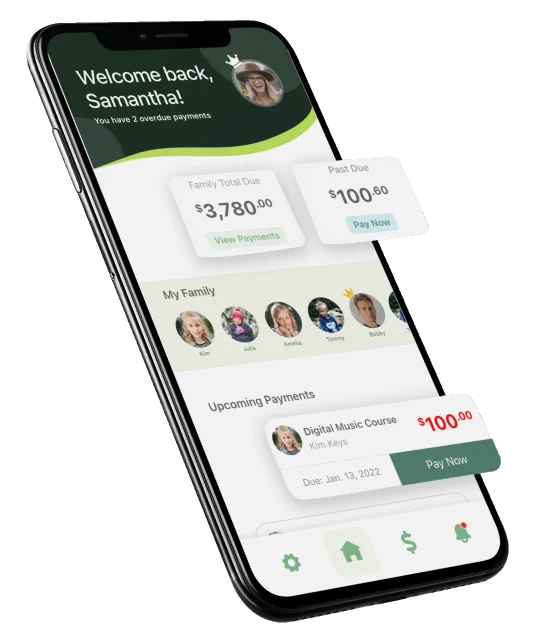
Grades, attendance, and payments—right from your phone.
Use the Sycamore App to stay connected to your student’s school day and manage key tasks in minutes.
Choose your device to download:
Getting started is quick:
Download
the app for iOS or Android.
Open the app
and enter school ID.
Sign in
using your
Sycamore parent account
provided by your school.
Not sure about your login?
Your school office can help you get access.
Already have the app? Open it and sign in with your school’s Sycamore account.
What You Can Do in the App
A simpler way to stay connected—without digging through emails or paperwork:
Check grades
and keep up with progress
View attendance
and recent activity
Make payments
quickly and securely (tuition, fees, and more)
Push notifications
alert you to reminders and important updates.
Setup Help and Step-by-Step Videos
Need help setting things up?
Watch quick walkthroughs for downloading the app, signing in, and making your first payment.
Initial Login and Payment Setup
Making a Past Due Payment
Sibling and Family Payment
Adding Credit Surplus
Check Attendance
View Grades in App
Download Financial Summary
Fee Payment
Removing a Payment Method
Adding a Second Payment Method ACH
Initial Login and Payment Setup
Making a Past Due Payment
Sibling and Family Payment
Adding Credit Surplus
Check Attendance
View Grades in App
Download Financial Summary
Fee Payment
Removing a Payment Method
Adding a Second Payment Method ACH
FAQs
Where do I get my login?
Your school provides your Sycamore parent account details. If you don’t have them, contact the school office.
I can’t sign in—what should I do?
Double-check your email/username and password, then try again. If you still can’t access your account, your school can reset it.
Can I manage more than one student?
Yes—if your account is linked to multiple students, you can switch between them in the app.
Is payment information secure?
Payments are processed through secure, encrypted payment workflows.
Having trouble logging into Sycamore?
For login or account questions, contact your school office.
2026 All Rights Reserved
DPA
Privacy Policy
Accessibility
Terms of Service
Products
Sycamore School (K-12 SIS)
Sycamore Payments
Tuition Refund Protection
Sycamore Parent App
Sycamore Campus (Higher Ed)
Sycamore Academy
Solutions
Multi-Site Networks
International Schools
Independent K-12
Financial Management
Sycamore School Websites
Fintech in Private Schools
Sycamore for Christian Schools
Sycamore for Catholic Schools
Sycamore for Lutheran Schools
Compare
Sycamore vs FACTS
Sycamore vs Blackbaud
Sycamore vs SchoolCues
Sycamore vs Veracross
Sycamore vs Alma
Sycamore vs Gradelink
Sycamore vs ClassReach
Sycamore vs Spreadsheets
About
About Us
Why Sycamore?
Testimonials
Careers
Media
Support
Schedule Demo
Login